NBDC Data Dictionary🔗
Tabulated HBCD study data is organized into a standardized table format per study instrument/measure, with each table containing a set of variables (see Data Structure Overview for details). Metadata is organized via a data dictionary following NBDC standards (similar to the ABCD Study), which provides detailed information about table variables, including variable name, label, description, data type, etc. All data dictionary elements are outlined below.
Dictionary Query Tool searches within the NBDC Data Access Platform currently display columns that are not applicable to HBCD study data, including columns ending with nda, deap, and redcap. Inapplicable columns will be removed in the future and can safely be ignored. Note that columns may also be blank if they have yet to be populated (currently common for columns ending with *_es). Note that only applicable columns are included in the data dictionary table above.
Datasets downloaded from the NBDC Data Access Platform contain two additional fields not listed in the data dictionary, cohort and site, derived directly from Visit Level Data table variables (par_visit_data_{cohort/site}) - see the Visit Level Data page for details.
Data Dictionary Elements🔗
CSV and TSV files do not contain an embedded data schema. Because column metadata are provided separately, import tools in Python and R may infer some column types incorrectly. For example:
-
Categorical codes stored as strings, such as
"0"and"1"for “No” and “Yes,” may be imported as numbers. -
Numeric columns may be imported as text when missing values are represented
as
n/a, as required for TSV files by the BIDS specification.
It is therefore critical that you specify column types during import, particularly data type (type_data), using the accompanying metadata. See NBDCtools for available functions to automate this process (e.g. read_dsv_formatted() for R users).
label_es)
| Name | Label | Description & Possible Values |
|---|---|---|
| Core Metadata | ||
domain |
Domain |
Study domain
e.g., Demographics — see Study Instruments
|
source |
Source |
Source of information
Biological Mother
Caregiver (Responsible Adult)
Child
General
|
study |
Study |
Study type
Core
Substudy
|
| Imaging | ||
atlas |
Atlas |
MRI atlas used for parcellated structural measures and functional timeseries
e.g., Glasser, Gordon — see full list
|
metric |
Metric |
Specific assessment metric
e.g., T1 Volume, Cortical Thickness, Sulcal Depth, Neurometabolites
|
sub_domain |
Subdomain |
Imaging domain subcategory
e.g., Structural MRI, Resting State fMRI, MR Spectroscopy
|
| Table-level Information | ||
table_label |
Table label |
Human-readable table name
e.g., Demographics
|
table_name |
Table name |
Database table name
e.g.,
sed_bm_demo
|
url_table |
Documentation | Link to measure README/documentation page (see all) |
url_table_warn_data |
Data Warning (table) | Table-level Data Warning |
url_table_warn_use |
Responsible Use Warning (table) | Table-level Responsible Use Warning |
| Variable-level Information | ||
description / label |
Variable label |
Human-readable variable name
e.g., Highest grade completed
|
header |
Header |
Header or instructions for a question set
e.g., For each item that describes your child...
|
instruction |
Instruction |
Instruction text preceding items
e.g., The next set of questions is about your child's behavior...
|
levels |
Levels |
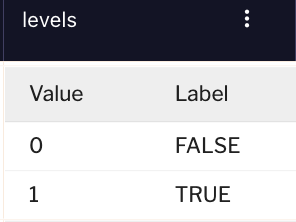
Value: Label mappings for categorical variables, e.g.
0: FALSE ; 1: TRUE
|
name |
Variable name |
Variable name within table
e.g.,
sed_bm_demo_edu_001
|
note |
Note |
Note displayed to participants
e.g., Enter weight in pounds.
|
type_data |
Data type |
character (for categorical variables)
date
double
integer
text
time
timestamp
|
type_level |
Level of measurement |
interval
nominal
ordinal
ratio
|
type_var |
Variable type |
Variable classification - see definitions below
administrative
derived item
item
summary score
|
unit |
Unit |
Measurement unit
e.g., years, cm, lbs
|
url_warn_data |
Data Warning (var) | Variable-level Data Warning |
url_warn_use |
Responsible Use Warning (var) | Variable-level Responsible Use Warning |
| Display Properties / Identifiers / Order | ||
branching_logic |
Branching logic | Logic controlling whether an item/question is shown |
identifier_column |
Identifier column(s) |
Participant/session identifiers
participant_id
session_id
run_id
|
order_display |
Display order | Order in which an item/question is displayed to participants for a given measure |
order_sort |
Sort order | Standard sort order in table/measure (and column order in database) |
type_field |
Field type |
Input type presented to participants
e.g., dropdown, radio, checkbox
|
Variable Types🔗
| Variable Type | Description & Possible Values |
|---|---|
| administrative | Data that gives context to the assessments.
Possible values include:
adjusted_age
candidate_age
gestational_age
date_taken
administration
lang
location
|
| derived item |
Derived from original participant data, either directly (e.g., sex from administrative records) or by combining variables (e.g., race and ethnicity)
See Basic Demographics for examples
|
| item | Original data provided by the participant, e.g. questions in a questionnaire |
| summary score | Summary and/or score output based on algorithmic conversions of items/raw data
e.g., summary_score, total_score
|